Huddle01 is a state-of-the-art innovation in the Web3 landscape that has bridged multimodal communication over the blockchain. It offers a…
A Developer’s Intro to Huddle01 SDK + Ideas to Build (Complete Guide) #

Huddle01 is a state-of-the-art innovation in the Web3 landscape that has bridged multimodal communication over the blockchain. It offers a robust and scalable solution to decentralized and privatized communication channels. This article will delve into the basics of Huddle01, some technical jargon, as well as a DIY tutorial for applications you can build with Huddle’s SDK.
What is Huddle01? #
Huddle01 empowers developers to create real-time communication features within their applications. As the world’s first DePIN (Decentralized Physical Infrastructure Network) tailored for dRTC (Decentralized Real-Time Communication), Huddle01 transforms how we connect and interact online.
Wait a sec, what is DePIN? #

DePIN stands for Decentralized Physical Infrastructure Network. Imagine a large organization where each employee contributes their skills and is rewarded based on their performance. In a DePIN, each participant (node) offers resources to the network and is incentivized with crypto tokens. Unlike a traditional, centralized company, DePIN operates in a decentralized manner, where control is distributed among the community members. As Huddle puts it, DePIN offers “people-powered communication”.
If you want to know more in DePIN, check this article out.
Understanding Huddle01: A dRTC Game Changer #
At the core of Huddle01 lies the concept of dRTC. Unlike traditional video conferencing solutions that rely on centralized servers, Huddle01 leverages a peer-to-peer network powered by users’ internet connection. This approach, often titled “people-powered network”, supports the key features of Huddle01.
- High-Fidelity A/V Communication: Huddle01 SDK ensures high-quality audio and video calls, delivering clear and crisp communication experiences.
- Token-Gated Access: Huddle’s DK supports token-gated access, allowing developers to control who can join communication channels based on token holding.
- Zero-Downtime Experience: User experience is the priority. SDK offers zero-downtime functionality ensuring that users do not experience disruptions during system failures or high traffic periods.
Selective Consuming on Huddle: #
Huddle01 facilitates the feature of selective consuming, allowing us to regulate who we receive media streams from. This helps us to accept media only from the peers we want. We can mute audio or turn off incoming video from someone for just ourselves, without affecting others.
Huddle Infrastructure #

Huddle doesn’t ask for much. It’s SDK integrates seamlessly into your usecase — be it a web app, React app or a full-fledged software! The underlying pipeline that governs this all is peer-to-peer connections, which Huddle’s SDK manages very well.
Huddle Concepts #
Now, let’s cover a couple of new concepts in the latest SDK that you shall see later on in the tutorial. Feel free to skip this if you’re ready.
Room #
A Huddle01 room is where you can host/attend meeting sessions. Each room is recognized by a unique roomID that is generated when you enter a room. A room never expires and you can have multiple sessions at a time inside the room.
Room states #
These represent the states of operation of a room — idle, connecting, failed, left, closed
Peer #
A peer is a participant inside a room. In programming jargon, it is an object containing all media streams of a peer in a room. Each peer is recognized by a peerID.
MediaStream #
It represents a stream of media content associated with a peer. Streams can be audio or video or both.
MediaStreamTrack #
It represents a single media track, which can be either audio or video.
Local #
These are functions related to your peer (i.e. yourself), prefixed with ‘local’.
localPeer — Your Peer object
localAudio — Your Audio stream
localVideo — Your Video stream
Remote #
These are functions associated with other peers in the same room, prefixed with ‘remote’. Performing any of these would require you to pass the peerID of that peer.
remotePeer — Another participant
remoteAudio — Their Audio stream
Remote Video — Their Video stream
Data Message #
Peers can exchange messages with each other in text form, not exceeding 280 characters.
Hooks #
Hooks are functions in Huddle01 that can be called from the imported Huddle packages (which we will see later on). They allow you to ‘hook’ into app states. The major hooks of the latest SDK version include:
- useRoom — joining, leaving, closing the room
- useLobby — as admin, control peers waiting in the lobby who can enter a locked room
- usePeerIds — returns peerIDs of all peers in a room
- useLocalAudio / useRemoteAudio — control your audio / interact with peer’s audio
- useLocalVIdeo / useRemoteVideo — control your video / interact with peer’s video
- useLocalScreenShare / useRemoteScreenShare — control your screenshare / modulate media from peer’s screenshare
Getting your hands dirty! #
Familiarizing with Huddle’s SDK is a walk in the park. Let’s get started on some technical jargon before integrating DePIN into your decentralized application (dApp).
Note: Before getting started on Huddle’s SDK for any project, ensure that you have nodejs installed on your system.
Installing required Huddle SDK packages #
Run any of these commands in your terminal:
npm i @huddle01/react @huddle01/server-sdk

pnpm i @huddle01/react @huddle01/server-sdk

yarn add @huddle01/react @huddle01/server-sdk

Create an App #
Run the following command in your terminal:
npm create next-app@latest

MetaMask and Generating Project ID and API Key #
Before generating an API key, set up an Ethereum wallet. MetaMask and Coinbase are go-tos.
Head over here and connect your wallet to your Huddle01 account, which will be used to authorize you to access Huddle01 infrastructure.
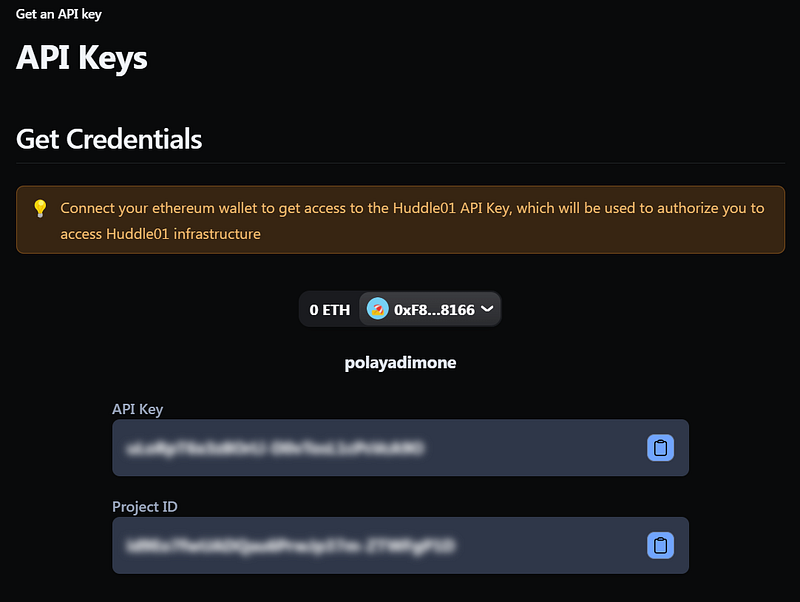
Generate your API key and Project ID and save it in the .env file in the root directory:
NEXT_PUBLIC_PROJECT_ID=
API_KEY=
Create an instance of the Huddle Client #
Create an instance of Huddle Client and pass it in Huddle Provider.
import type { Metadata } from "next";
import { Inter } from "next/font/google";
import "./globals.css";
import HuddleContextProvider from "@/context/HuddleContextProvider";
import { Web3Modal } from "@/context/Web3Modal";
import { HuddleClient, HuddleProvider } from "@huddle01/react";

const huddleClient = new HuddleClient({
   projectId: process.env.NEXT_PUBLIC_PROJECT_ID!,});

export default function RootLayout({
   children,
 }: Readonly<{
   children: React.ReactNode;
 }>) {
   return (
     <html lang="en">
       <HuddleProvider client={huddleClient}>
         <body className={inter.className}>{children}</body>
       </HuddleProvider>
     </html>
   );
 }
Generating RoomID #
To create a room, we need a roomId, which is called from the server-side using the create-room API. Howeverless, this can also be performed in a less safe, serverless manner.
"use server";
export const createRoom = async () => {
  const response = await fetch("https://api.huddle01.com/api/v1/create-room", {
    method: "POST",
    body: JSON.stringify({
      title: "Huddle Room",
    }),
    headers: {
      "Content-type": "application/json",
      "x-api-key": process.env.API_KEY!,
    },
    cache: "no-cache",
  });
  const data = await response.json();
  const roomId = data.data.roomId;
  return roomId;
};
Generating Access Token #
To join a new or already existing room, an accessToken must be generated.
import { AccessToken, Role } from '@huddle01/server-sdk/auth';

export const dynamic = 'force-dynamic';

const createToken = async (
  roomId: string,
  role: string,
  displayName: string
) => {
  const access = new AccessToken({
    apiKey: process.env.API_KEY!,
    roomId: roomId as string,
    role: role,
    permissions: {
      admin: true,
      canConsume: true,
      canProduce: true,
      canProduceSources: {
        cam: true,
        mic: true,
        screen: true,
      },
      canRecvData: true,
      canSendData: true,
      canUpdateMetadata: true,
    },
    options: {
      metadata: {
        displayName,
        isHandRaised: false,
      },
    },
  });
  const token = await access.toJwt();
  return token;
};
Joining and Leaving Rooms #
Now that we have the roomId and accessToken, we can use the joinRoom method from the useRoom hook to join or leave a room.
import { useRoom } from '@huddle01/react/hooks';

const App = () => {
  const { joinRoom, leaveRoom } = useRoom({
    onJoin: () => {
      console.log('Joined');
    },
    onLeave: () => {
      console.log('Left');
    },
  });

  return (

      <button onClick={() => {
        joinRoom({
          roomId: 'ROOM_ID',
          token: 'ACCESS_TOKEN'
        });
      }}>
        Join Room
      </button>
      <button onClick={leaveRoom}>
        Leave Room
      </button>

  );
};
Use Cases for Huddle01 SDK #
Huddle01 SDK is versatile, opening up a wide range of possibilities for developers. Here are some use cases to get you started:
Token Gated Community Events #
Build exclusive communication channels for token holders, enhancing community engagement through token-gated access.
Decentralised Collaboration Platforms #
Help teams and communities working from remote areas collaborate on their task seamlessly. Develop tools for remote teams that feature secure video meetings, file sharing, and real-time messaging, all powered by Huddle01’s dRTC infrastructure.
Virtual-Study Group Platform #
Allow students from all parts of the world to come together for collaborative learning. Huddles01’s SDK allows them to have real-time discussion, study groups and help in peer-to-peer learning.
By Aloshdenny on May 25, 2024.
Exported from Medium on February 2, 2026.